Tactacam REVEAL
Deer Management SystemsPhotography
4.82.30K Reviews
- Version
- 5.10.4
- Installs
- 500.00K
- Age Rating
- Everyone
Screenshots
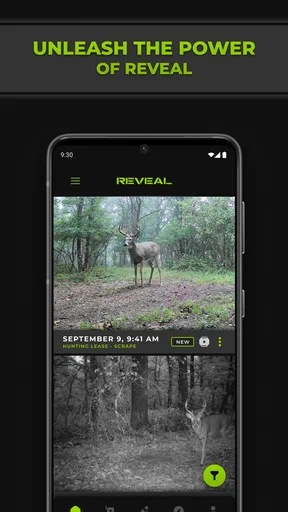
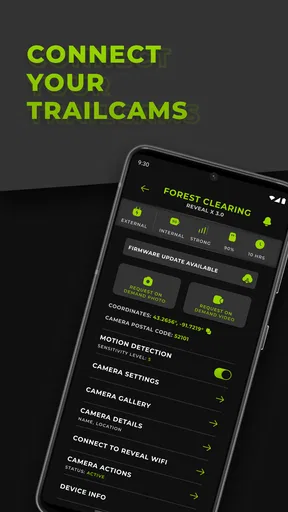
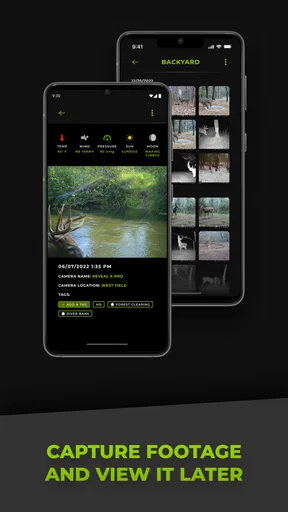
Our Review of Tactacam REVEAL
 Analysis by Appyee
Using a cellular trail camera is only half the job. The other half is checking what the camera sees, deciding which images matter, and keeping the whole routine manageable over time. That is where Tactacam REVEAL makes its case. It is a free photography app from Deer Management Systems, built to connect a TACTACAM REVEAL camera using Verizon or AT&T cellular service with a phone-based viewing workflow. I found the appeal immediate: instead of treating the camera as a box that must be visited, the app turns it into something I can monitor from a distance.
That convenience is especially useful for wildlife observation, property checks, and anyone who places a camera somewhere inconvenient to reach. Still, I would not describe it as a complete replacement for physical maintenance. The app can make remote monitoring easier, but it cannot remove the need to think about camera placement, power, signal, storage, or the conditions around the device. My lasting impression is that its value depends less on opening it constantly and more on whether it fits naturally into a repeatable habit.
What the first week feels like
The first week is when the app feels most impressive. After connecting a compatible REVEAL cellular camera, the basic idea is easy to understand: the camera captures material in the field, and the app gives me a practical place to review it. That changes the rhythm of using a trail camera. I am no longer planning every visit around curiosity. I can check remotely, identify activity, and decide whether a trip is actually necessary.
That distinction matters for cameras placed on private land, wooded property, hunting areas, or locations that take time to reach. A normal camera often creates a guessing game. I may wonder whether it has captured anything, whether the angle is still useful, or whether an animal is using a trail at all. With the app connected to a REVEAL camera, I can make those decisions with more information instead of relying entirely on a scheduled visit.
The strongest early use case is not simply looking at attractive wildlife photos. It is filtering effort. If the camera is quiet, I can avoid an unnecessary drive. If it shows meaningful movement, I can plan a visit with a clearer purpose. If the images suggest the camera has been triggered by the wrong part of the scene, I can treat that as a placement problem rather than waiting weeks to discover it.
I also like the separation between watching and acting. The app is useful from a sofa, office, or roadside stop, while physical adjustments remain a separate task. That sounds obvious, but it encourages better decisions. I can review the evidence first, then bring the right supplies when I do visit: fresh power, a mounting adjustment, a cleaning cloth, or simply patience for a more careful repositioning.
The initial learning curve is not difficult, but it is not completely invisible either. A user still needs a compatible TACTACAM REVEAL cellular camera and a working Verizon or AT&T connection for the intended setup. The app itself cannot turn an ordinary phone camera or a non-compatible trail camera into a remote system. I would confirm the camera model and cellular arrangement before building a monitoring plan around it.
One practical tip made a difference in how I approached the first week: I treated the first images as a test of the entire setup, not as proof that the camera was finished. Image timing, framing, animal movement, and the camera’s position all tell a story. A few early captures can reveal whether the lens is aimed too high, whether a nearby branch is stealing attention, or whether the chosen location produces useful activity. The app is most valuable when I use those images to improve the field setup.
Turning remote images into useful decisions
The app’s real advantage becomes clearer when I stop checking it passively. Instead of scrolling through every arrival with equal interest, I use a simple routine. First I look for changes: new activity, a different direction of movement, an empty stretch after earlier activity, or repeated triggers in an unhelpful part of the frame. Then I decide whether the information requires action.
This approach prevents the first-week novelty from becoming endless checking. A cellular camera can make every notification feel urgent, even when the image is not important. I found it more useful to ask, “What will I do differently because I saw this?” If the answer is nothing, the image can wait. If the answer involves a camera visit, a location change, or closer observation of a pattern, the app has earned that moment of attention.
For wildlife watchers, another helpful habit is to compare images over time rather than judging one frame in isolation. A single photograph may be interesting, but repeated captures can show whether a path is consistently active. This is where remote access becomes more than a convenience feature. It supports a lightweight observation process without forcing me to disturb the area every time I want an update.
I would be careful, however, about expecting the app to solve every interpretation problem. A photograph still needs context. A quiet period might mean low activity, a change in movement, or a camera issue. The app can bring the image to me, but it cannot replace judgment about the location. That is a healthy limitation because it keeps the user involved in the important decisions rather than presenting remote monitoring as automatic certainty.
Why it can remain useful month after month
The first-week appeal comes from immediacy. The month-to-month value comes from reducing wasted trips and making observation more consistent. That difference is what determines whether I would keep an app like this installed. If I only wanted occasional pictures, a conventional trail camera and periodic card check might be enough. If I care about ongoing awareness, the remote workflow has a stronger reason to stay in my routine.
For example, imagine placing a camera near the edge of a large property before a busy month. I may not have time to visit every few days, but I still want to know whether the location is active and whether the camera remains pointed at the right area. A quick review from the app can help me choose when a visit is worthwhile. The benefit is not just saving one journey; it is making the entire monitoring plan less dependent on spare time.
That recurring value also helps with seasonal changes. A location that made sense earlier may become less useful after vegetation changes, weather shifts, or animal movement patterns change. Reviewing the incoming images gives me a reason to reassess the setup instead of leaving it untouched because the camera is difficult to reach. I see the app as a feedback loop: place the camera, review what it produces, adjust when needed, and repeat.
There is a trade-off here. Remote access can encourage over-monitoring. If I check too often, the app becomes a source of small interruptions rather than a tool for better decisions. The best long-term routine is usually selective. I prefer checking at planned times and responding to meaningful changes, rather than letting every image dictate my attention. That habit is important because the app’s convenience can otherwise create its own form of fatigue.
Another reason to keep it installed is that it supports different levels of involvement. A serious wildlife observer may review patterns carefully, while a property owner may only need occasional reassurance that the camera is still producing useful material. The same basic connection can serve both people, but the experience will feel better if expectations are realistic. It is not necessary to turn every image into a detailed record for the app to be worthwhile.
The public response also suggests that the app has found a substantial audience. It holds an average rating of 4.8 from around 25 thousand ratings, with more than 2 thousand written reviews and over 500 thousand installs. I would not treat those figures as a guarantee that every setup will be trouble-free, because cellular camera performance depends on the surrounding equipment and location. Still, they indicate that the remote-camera idea is resonating with many users.
Where it beats the usual alternatives
The obvious alternative is a standard trail camera that stores images locally. That option can be simpler in places without dependable cellular service, and it may suit someone who already visits the property regularly. It also creates fewer reasons to check a phone. If I am comfortable collecting a memory card or reviewing the camera in person, a cellular app may feel unnecessary.
REVEAL has the advantage when distance and timing matter. Instead of waiting for the next visit, I can use current images to decide whether the camera deserves attention. That is particularly valuable when the camera is placed somewhere muddy, steep, remote, or simply inconvenient. The app does not make the field hardware disappear, but it makes the gap between capture and decision much shorter.
It is also more focused than using a general photo gallery. A normal gallery is designed for images already on the phone. This app belongs to a specific camera workflow, so its usefulness comes from connecting remote observation with the REVEAL hardware. I would choose it for that dedicated purpose, not as a replacement for a general photography organizer or editing app.
On the other hand, someone who wants creative filters, manual camera controls, social sharing, or polished photo editing should look elsewhere. This is a monitoring companion, not a broad mobile photography studio. Its strength is access to a particular kind of camera information, and its limits come from that same specialization.
The maintenance burden people notice later
The biggest long-term mistake would be assuming that remote visibility equals remote maintenance. The app can help me see what the camera is capturing, but I still need to care for the physical unit. Power, mounting, lens cleanliness, weather exposure, cellular conditions, and the surrounding scene all remain part of the job. A phone screen can show that something is wrong; it cannot necessarily correct the cause.
I recommend treating the app as an early-warning tool. If images stop arriving, become repetitive, or show a badly changed frame, that is a reason to investigate the camera rather than simply blaming the app. A planned maintenance visit is still useful, especially when the camera has been exposed to difficult conditions or when a location is important enough that missed activity would matter.
There is also a mental maintenance burden. The more cameras or locations I monitor, the easier it becomes for the app to turn into a stream of small tasks. I need a naming and checking routine that makes sense to me, even if that routine is very simple. Without one, I can lose track of which location produced an image or why I opened the app in the first place.
My practical advice is to pair every remote check with a clear question. Is the camera still aimed correctly? Is the location active? Do I need to visit? Has the scene changed? This keeps the app connected to a real decision and makes the monthly routine less tiring. It also exposes problems sooner than aimless browsing because I am looking for evidence that matters.
The app is free, which lowers the barrier to trying the software itself. That does not mean the entire remote-camera setup is cost-free, since the compatible camera and cellular arrangement are separate considerations. I would evaluate the value based on the time and travel saved, not merely on the download price. For someone who lives close to the camera, the free app may add little. For someone managing distant locations, the same app can justify its place quickly.
What causes fatigue after the novelty fades
The first source of fatigue is repetition. A remote camera can produce many images that are technically new but practically unimportant. If I open the app expecting every capture to be meaningful, I will probably lose interest. The better approach is to decide what counts as useful before the stream becomes noisy.
The second is dependence on a chain of conditions. The experience involves the REVEAL camera, cellular connectivity through Verizon or AT&T, the physical placement, and the phone app. When one part needs attention, the convenience feels less magical. This is not a reason to reject the product, but it is a reason to choose it with open eyes. A simple offline camera can be calmer if I prefer fewer moving parts.
The third is the temptation to confuse access with control. Seeing an image remotely can make me feel close to the location, but the important changes still happen in the field. I cannot adjust a branch, clean a lens, improve a mounting angle, or solve every environmental problem from the app. The product works best when remote information helps me use physical visits more intelligently.
There can also be a mismatch between the app and the user’s goals. If I want a casual collection of attractive nature photos, the monitoring workflow may feel too specialized. If I need a dependable way to watch a distant area over time, it makes more sense. The deciding question is not whether remote images are exciting; it is whether receiving them changes what I would otherwise do.
Compatibility should be part of that decision before installation. The app is intended for a TACTACAM REVEAL cellular camera, specifically with Verizon or AT&T connectivity in the stated setup. Someone with a different brand or a camera that does not use the same arrangement should not assume the app will fit. That is the kind of detail worth checking early, because no amount of enthusiasm can compensate for an incompatible camera.
The age rating is Everyone, and the app is available at no charge. It runs on Android 7.0 or later, and the current version is 5.10.4. I mention those details because they make the app approachable for a wide range of Android phones, while still leaving the camera and cellular requirements as the more important practical checks. The software’s accessibility does not remove the need to confirm that the complete setup matches the intended use.
My long-term verdict on keeping it installed
After the novelty fades, I think Tactacam REVEAL earns lasting space for the right user. Its strongest quality is not that it makes wildlife photography more exciting. It makes remote camera ownership more actionable. I can spend less time traveling just to discover what happened and more time deciding which visits, adjustments, or observations are worth making.
I would recommend it to people who already have, or are planning to use, a compatible TACTACAM REVEAL cellular camera and who place real value on checking distant locations. Property owners, wildlife observers, and users who cannot visit a camera frequently are the clearest fit. The app is also useful for anyone who wants a simple observation habit rather than a full photo-editing environment.
I would skip it if I do not own compatible hardware, if I have no dependable reason to monitor a remote location, or if I prefer a low-maintenance camera that I check manually. I would also choose a conventional local-storage camera when cellular access is impractical or when the extra remote workflow would create more stress than convenience. The app is specialized, and that specialization is a benefit only when it matches the job.
My best advice is to start with one clear location and one clear purpose. Use the early images to judge framing and activity, establish a checking schedule, and reserve physical visits for decisions that actually require them. That workflow protects the app from becoming an endless notification source and helps the remote connection deliver its real benefit.
In the end, the lasting value is a matter of habit. If I use the app to reduce wasted trips, notice changes, and maintain a better camera placement, it becomes a useful part of my routine. If I only open it for occasional curiosity, the excitement will probably fade. For me, that makes it a worthwhile free companion for the REVEAL system, provided I remember that remote viewing improves maintenance decisions but never replaces maintenance itself.
Verdict
Strengths of Tactacam REVEAL
- Remote wildlife monitoring without visiting the camera site.
- Useful cellular alerts for movement, photos, and battery status.
- Supports high-resolution photos and video capture options.
- App makes organizing multiple cameras relatively convenient.
- Designed for outdoor use with weather-resistant camera hardware.
Limitations of Tactacam REVEAL
- Cellular service and a compatible plan are required for remote features.
- Photo and video transmission can consume data quickly.
- Performance depends heavily on network coverage at the camera location.
- Cloud storage and advanced features may require paid subscriptions.
- Initial setup can be time-consuming, especially for multiple cameras.
Similar Picks in This Category
View All
Google Photos
Google LLC4.4

Gallery
Google LLC4.2

Picsart AI Photo Editor, Video
PicsArt, Inc.3.9

B612 AI Photo&Video Editor
SNOW Corporation4.1

BeautyPlus-Selfie Photo Editor
PIXOCIAL TECHNOLOGY (SINGAPORE) PTE. LTD.4.5

Remini - AI Photo Enhancer
Bending Spoons4.1
Frequently Asked Questions
What is Tactacam REVEAL, and what is it used for?
Tactacam REVEAL is a companion app for compatible REVEAL cellular trail cameras. After connecting the camera to your account, you can view and organize captured photos and videos, check camera status, review activity, and manage settings remotely. It is primarily designed for wildlife observation, scouting, property monitoring, and other situations where visiting the camera frequently is inconvenient.
Does Tactacam REVEAL require a cellular plan or subscription?
Yes, the app itself is generally free to download, but compatible REVEAL cellular cameras need an active service plan and a supported mobile network to transmit images remotely. Plan availability, pricing, data limits, and coverage depend on your location and the camera model. Before purchasing, confirm that the camera works with the carrier options available in your area and choose a plan suitable for your expected photo volume.
How do I connect a REVEAL camera to the Tactacam app?
To get started, create or sign in to your Tactacam REVEAL account, add the compatible camera, and follow the activation instructions shown in the app. You may need the camera’s identification details, a SIM or service activation, and a location with adequate cellular coverage. Camera firmware, battery condition, and correct antenna installation can also affect the initial connection and setup process.
Can I change camera settings and view photos remotely?
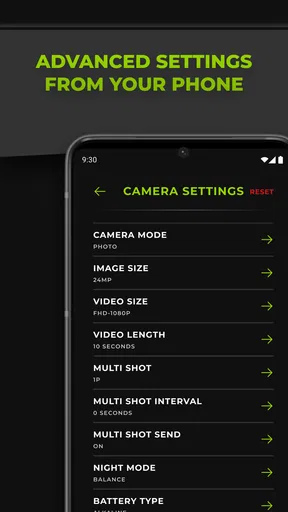
With a supported camera and active connection, Tactacam REVEAL allows many users to review transmitted images and manage important settings without physically removing the camera from the field. Available controls vary by model and service plan, but may include capture modes, schedules, image quality, sensitivity, and transmission preferences. Changes may not appear instantly because the camera must connect to the cellular network.
What should I do if the camera is not sending photos to the app?
First, check that the camera is powered on, has sufficient battery life, and is positioned where the antenna can receive a reliable cellular signal. Confirm that the service plan is active and that the device appears online in your account. It is also worth checking storage, firmware, camera settings, and the app’s notification permissions. If the problem continues, restart the camera and consult Tactacam support for model-specific troubleshooting.
